

I would not have guessed how much of a signature is rhythm rather than shape. Signature fonts copy that rhythm: letters that join, lean forward and vary a little in thickness, so a typed name reads like something written in a second. They work best on invitations, watermarks, thank-you cards and logos, and they work poorly anywhere a person has to personally vouch for a document. A typed name set in a script is a design asset, and I think the honest way to use one is to treat it as that. Plenty of guides list fonts and stop there, which leaves out the part that decides whether a typed name looks believable: how the letters join, how repeated letters behave, and how the name sits on the page. Below you will find what a signature font actually is, which traits make one believable, a step-by-step setup, and fixes for the awkward joins some names produce. The last section covers the limits of a typed signature, without legal advice. Every font named here is a real listing in the FontCue handwriting category, and the licence details come from each font’s own page. Where a page says little about a font, I say little too and point you to the page.
Affiliate Disclosure: If you buy through links on our site, we may earn a small affiliate commission to help support the blog – at no extra cost to you. It never influences our product selection process. Thank you!
- Signature Fonts: How to Make a Handwritten-Style Signature Look Real
- What a signature font is and is not
- Traits of a believable signature
- Signature fonts for logos, watermarks and branding
- Setting a name in a signature font, step by step
- Fixing awkward letter joins and initials
- Legal and practical limits of a typed signature
- FAQ
- Choosing a signature font you will keep using
Get the Free Handwriting Fonts — free download.
Download FontsWhat a signature font is and is not
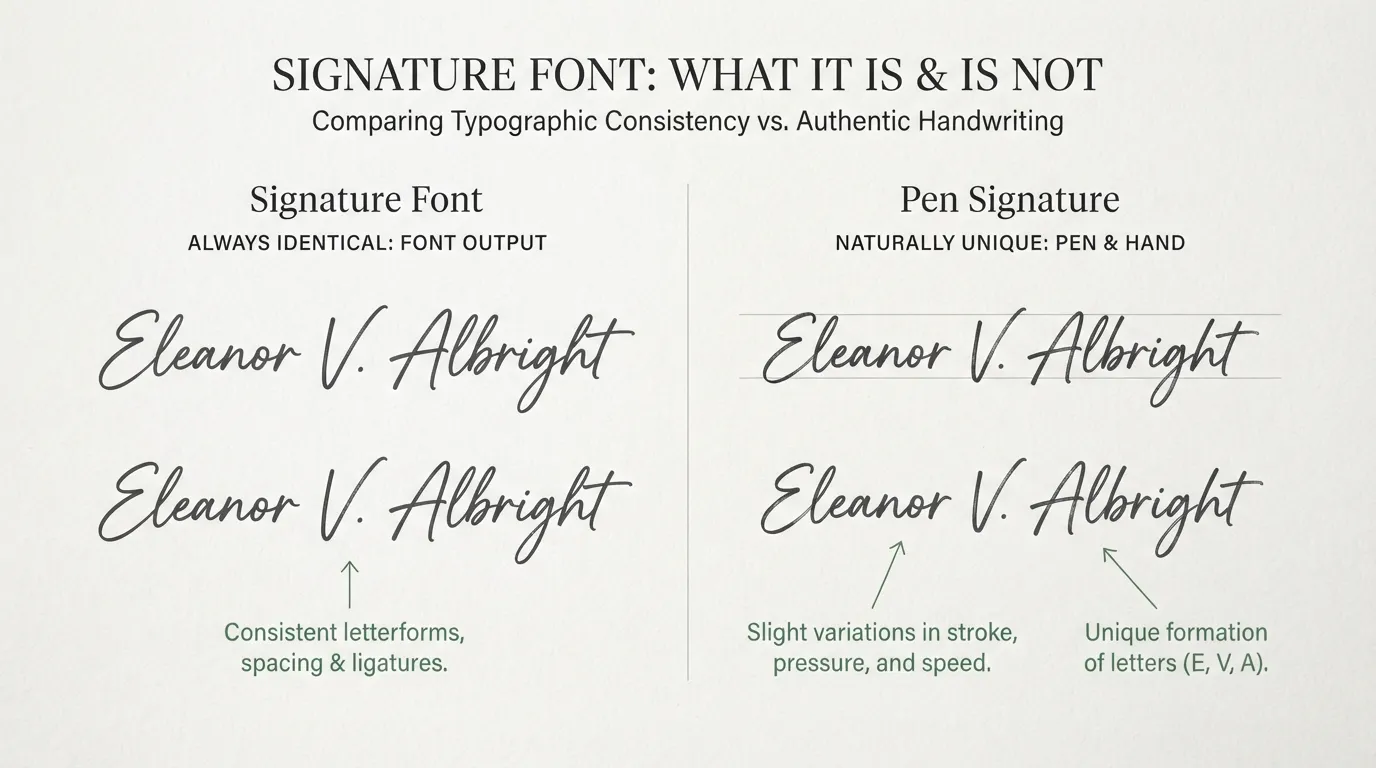
A signature font is a script or handwriting typeface whose letters imitate quick, connected pen strokes. It is still a font, which means every “a” you type is the same shape as every other “a”, and the same name typed twice looks identical. A real signature is a motor habit, so two of your own signatures are never quite the same.
That difference decides what a signature font is good for. It is a styled rendering of a name, similar to a name set in calligraphy on a place card. It is not your signature unless you adopt it as your own mark, and it is not a scan of your handwriting. If you want your real handwriting, sign on paper, photograph or scan it, and clean it up. If you want a typed name that looks personal, a font is the faster route.
The category is wide. Some options lean elegant and formal. Parisienne is described on its page as having generous loops and a light calligraphic stroke that reads as elegant rather than playful. Sacramento is a fine-lined, monoline script with tall ascenders and sweeping connections between letters. Others lean casual. Shadows Into Light reads like a quick note written with a fine marker, connected enough to feel like handwriting and loose enough to stay relaxed.
Pick the end of that range that matches the document. A formal letter and a casual birthday card want different pens, even when both carry the same name. If you are browsing, the handwriting category lists them all, and our calligraphy and cursive alphabet reference shows how connected letters are built.
Traits of a believable signature
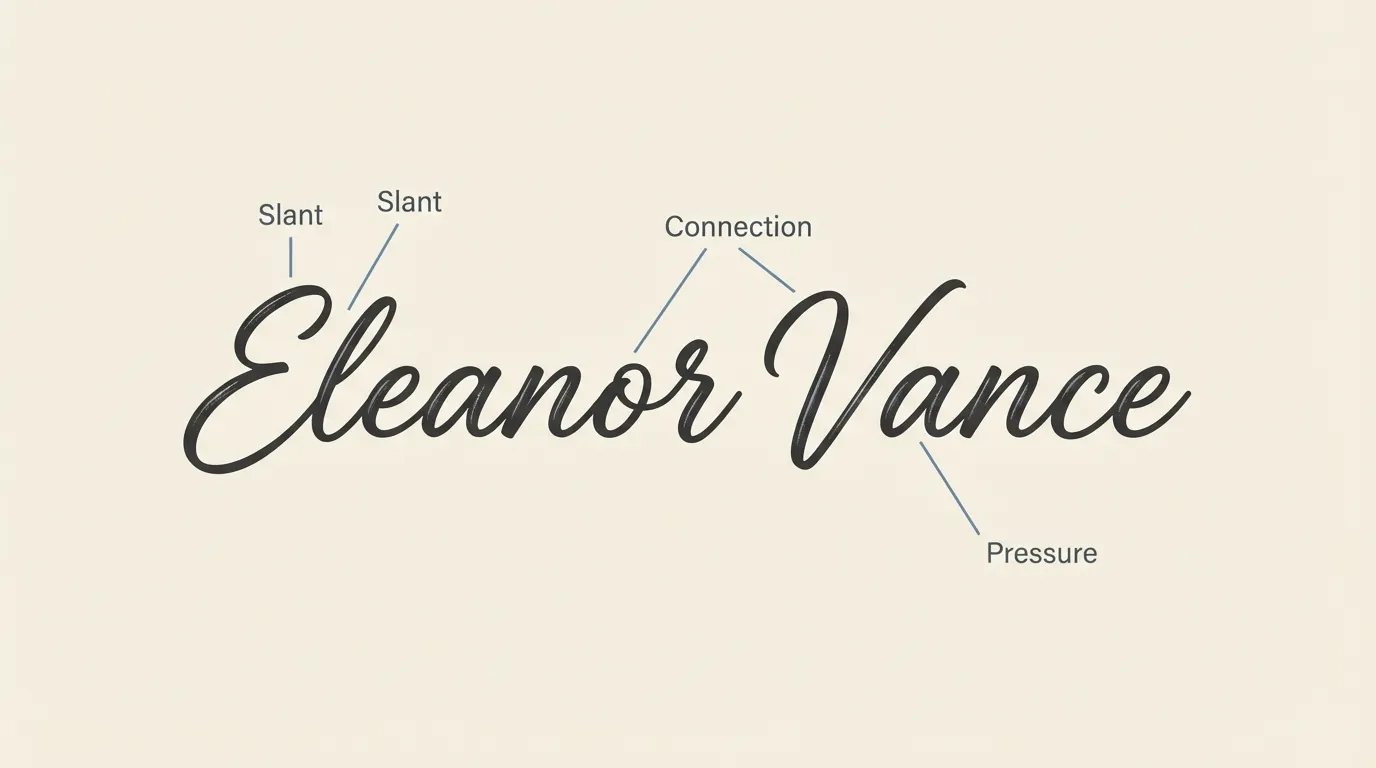
Slant, connection and pressure do most of the work.
Slant is the forward lean. Real signatures are written fast, and speed pulls the letters to the right. An upright script looks typeset, because nobody signs with the ruler-straight posture of a heading. When you test a font, check that the lean is consistent but not extreme. If you need more, a small skew in your design tool helps, and the skew should be the same for every letter in the name.
Connection is how the letters join. A believable signature runs through the name with few lifts of the pen, so look for a font where the letters flow into each other without gaps. Sacramento’s page describes sweeping connections between letters, which is what you want to see. Disconnected handwriting fonts read as printing, which is closer to a note than a signature.
Pressure is the thick and thin variation that comes from a pen pressing and lifting. Monoline fonts have none, so they look like a felt-tip or a technical pen. Fonts with a calligraphic stroke have it built in. Feltpen is a light, quick script described as looking like it was written with a felt-tip pen, which is the monoline look. Either can work, but pick one on purpose, because mixing the two in one lockup looks like two different pens.
Repeated letters are a trait many signature font roundups skip. Type “Ellis” or “Bennett” in an ordinary script and the double letters match exactly, which is the fastest way to give away that it was typed. Pecita addresses this directly. Its page says it mimics handwriting with advanced OpenType features that vary how repeated letters look, and that it has full Unicode Latin support. Whether those variations kick in depends on your software, so test your own name before committing.
Signature fonts for logos, watermarks and branding
A signature-style wordmark is one of the most common uses of this category, and the easiest to get right. Photographers, makeup artists, bakers and consultants use their own name in script as a logo, a watermark on images, or a mark at the bottom of a product label.
Watermarks need care. A thin script placed over a photo disappears on busy areas, so test it over the lightest and darkest parts of the picture. Lower the opacity a little rather than shrinking the lettering, since small thin strokes break up. Keep it to one corner and leave the same margin on every image so it reads as a signature rather than a stamp.
For logos, a fine-lined script such as Princess Sofia fits when the brand is romantic or fairy-tale in tone. Its page describes a fine, looping script with delicate flourishes and says it is best used at larger sizes, on wedding stationery, quote graphics, logos and packaging. A thin script that looks lovely at 80 points on a card can vanish on a 32-pixel favicon, so make a simplified version for small sizes, or use only the initial there.
Pair a signature wordmark with a plain companion font for everything else: a clean sans-serif for the business name, address or tagline. The script carries the personality and the sans carries the information. Our guide to monogram and initial fonts shows how to build a mark from initials, and the luxury and elegant branding fonts guide has pairings for the formal end.
The font licence matters when the name becomes a business mark. Every font linked in this article shows SIL Open Font License 1.1 with commercial use marked as allowed on its FontCue page. Read that page for the font you choose before putting it on anything you sell.

Setting a name in a signature font, step by step
This sequence sets a name so it reads as a signature rather than a typed field.
- Choose three candidate fonts. Open the handwriting category and pick fonts with connected letters and a forward slant. Good starting points are Sacramento, Parisienne and Kristi. Check each page’s licence line.
- Type your real name, not a sample. The alphabet specimen on a font page flatters the font. Your own name tells you whether the capitals work, whether certain pairs join badly, and whether the name stays legible.
- Set it large first. Work at a big size so you can see the joins. A signature is judged on its overall rhythm, and you cannot see that at 12 points.
- Adjust spacing and slant. Tighten the tracking slightly so the letters nearly touch. Apply a small skew if the lean feels weak. Never stretch the letters wider than their natural proportions.
- Convert to outlines and edit. Turning the text into shapes lets you move, resize or redraw individual letters. This is where you fix joins, which the next section covers.
- Add one personal stroke. An underline that runs out of the last letter, a crossbar on a “t” that extends across the name, or a loop on the first capital. One stroke is enough, because three flourishes turn a signature into decoration.
- Pick one ink color. Near-black or a dark blue reads as pen ink. Use the same color wherever the signature appears.
- Save a transparent PNG and an SVG. Keep both. The vector copy scales for print, and the PNG goes into documents and design tools.
Then check the result at the size you will use. If you cannot read your own name at that size, simplify it.

Fixing awkward letter joins and initials
Even good fonts produce bad joins for some names, usually where two tall letters meet or where a capital has to connect to a lowercase letter it was not designed for. The fixes are small and mostly manual.
If two letters that should connect have a visible break, convert the text to outlines, move one letter until the strokes overlap, then merge the shapes or add a short stroke between them. Match the new stroke’s thickness to the strokes on either side.
Tall descenders and ascenders sometimes crash into the line above or below, or into a neighbor. Nudge the letter, or reduce the size of just that letter by a few percent. Resizing one letter slightly is also what a real hand does, so it helps the signature look less perfect.
Matching double letters are a giveaway, as noted above. Duplicate one of the two letters, scale it to about 95 percent and rotate it a degree or two. It costs a minute and removes the most mechanical-looking part of many names.
Many signatures are a flourished first initial followed by a plain surname, and some people sign with initials only. Ornate capitals are where script fonts show their style, so test your initial in several fonts before settling. Kristi and La Belle Aurore are both in the handwriting category, so compare them on your own letters and see which capital you prefer. If an initial looks too ornate beside a plain surname, set the surname in a calmer, lighter font.
Keep the first and last name at the same baseline, or lift the surname a few points, so the signature slopes slightly upward. A signature that sags downward to the right looks tired, and one that climbs a little looks confident.

Legal and practical limits of a typed signature
This section is not legal advice. Whether a typed or font-styled name counts as a valid signature varies by country and by the kind of document. Some documents and places treat electronic signatures as acceptable, and others require specific methods or a handwritten signature. If a signature carries legal weight, such as a contract, a financial form or a notarized paper, check the rules that apply to that document or ask whoever is requesting it.
There are also practical limits that have nothing to do with the law. A font signature is identical every time, and it is available to anyone who downloads the same font, so it cannot prove who signed. Anyone can type your name in the same typeface. Some organizations have their own signature requirements and may not accept a typed version in place of ink.
The low-risk uses are the ones where nobody is asked to vouch for anything: a sign-off on a card, a certificate template that a real person signs later, a watermark, a logo, a book dedication. There the typed signature is design, and nobody is misled.
Do not set a typed signature in the name of a real person who has not agreed to it. Imitating someone else’s signature on a document is a different matter, and this guide does not cover it.
For licensing questions about the fonts themselves, our guide to free fonts and commercial use explains what to check on a font page.
FAQ
There is no single best one. A good signature font is connected, slanted and slightly uneven, and it should still be readable when your name is short. Try your own name in three or four candidates from the handwriting category, then keep the one that looks least like a font and most like something written quickly.
Many are. The signature fonts linked in this guide are listed on FontCue with SIL Open Font License 1.1 terms and commercial use marked as allowed. Confirm the licence on the font page of any font you choose, because terms differ from font to font.
It depends on the country and on the document. Some places accept a typed name as a signature for certain agreements and not for others. This guide is not legal advice, so check the rules that apply to your document, or ask the organization asking for the signature.
Break the perfect repetition. Replace one or two letters with slightly resized copies, trim the joins by hand, and add one stroke of your own, such as an underline. Set the result in a single ink color and use it at the same size each time so it stays recognizable.
Choosing a signature font you will keep using
Type your own name in three signature fonts, set each one large, and look for the same things every time: a forward slant, joins that hold, capitals that suit your initial and a thickness that survives your smallest use. Fix the repeated letters, add a single stroke of your own, and save the result as a vector and a transparent PNG. Most signature fonts will give you a decent first draft of a name, and the edits above are what turn it into something you would put on a card with your own name on it. Treat that file as a design asset for cards, watermarks and logos, and sign by hand any paper where someone has to personally vouch for it. Keep the licence line from the font page with the file, in case a client or printer asks where the lettering came from. If you want to compare more candidates, the free handwriting category is a good place to start, and the licence line on each font page tells you what you may do with it.


