

I keep a simple rule for vintage fonts: pick the decade first, then the font, and stick to it even when a tempting font from another era shows up. A font that suits a 1950s diner menu will look wrong on a 1920s theater poster, even though both count as old-fashioned. Each era had its own habits. The 1920s liked geometry and tall capitals, the 1950s liked friendly signage and flowing scripts, and the 1970s liked fat, soft shapes that look good in warm orange. Once you can name those habits, you can choose retro fonts on purpose. This guide covers what makes a font feel vintage, then walks through art deco fonts, 1950s diner lettering and 70s fonts with a groovy font feel, with free picks from the FontCue catalog for each. It also covers pairing a vintage headline with a body font people can read, adding age and texture without wrecking legibility, and what to check before you put any of it on a print or a product. None of the fonts here are copies of a specific brand’s logo. I describe traits only, and you can copy the settings into Canva, Illustrator or whatever layout tool you already use, then swap in your own words and colors.
Affiliate Disclosure: If you buy through links on our site, we may earn a small affiliate commission to help support the blog – at no extra cost to you. It never influences our product selection process. Thank you!
- Vintage and Retro Fonts by Decade: Art Deco, 1950s Diners and 70s Groovy
- What makes a font feel vintage
- Art deco and 1920s geometry
- 1950s diners, signs and script
- 70s groovy and rounded display
- Pairing a vintage headline with a readable body font
- Aging and texture without hurting legibility
- Licensing for prints and merch
- Choosing vintage fonts by decade
Get the Free Display Fonts — free download.
Download FontsWhat makes a font feel vintage
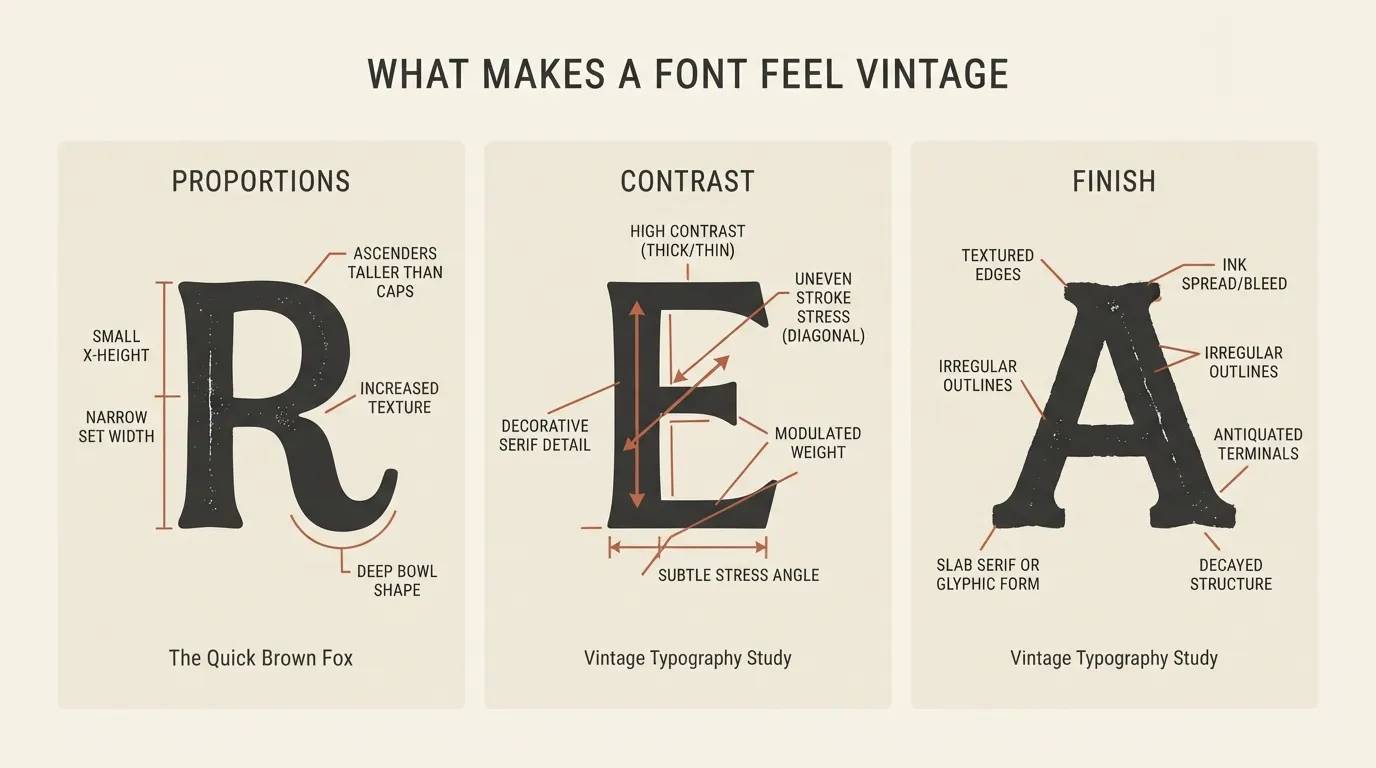
Three things carry most of the weight: proportions, contrast and finish. Proportions come first. Early twentieth-century lettering tends to be tall and narrow, mid-century signage is wider and rounder, and the 70s pushed toward fat, soft forms. Contrast is the second signal. Old advertising type often mixes very thick and very thin strokes, which reads as printed rather than digital. Finish is the last one: a slightly rough edge, an inline or a shadow suggests ink, paint or neon rather than a clean screen render.
Era also lives in the details around the font, and a color palette can matter as much as the typeface. Cream, rust and faded green say mid-century. Mustard, brown and burnt orange say 70s. Deep black with gold says deco. When a font seems close but not quite right, the fix is often the color or the layout, not another font.
Vintage and retro are loose terms, and most searchers use them interchangeably. Grotesque Bourgeoisie shows what real age can look like. FontCue describes it as reviving an 1880s typeface used for business cards and titles, with the fussy, ornamental charm of Victorian print. That is older than anything in the decades below. For older, gothic-leaning styles, our guide to old English and gothic vintage fonts covers where they work.
Art deco and 1920s geometry
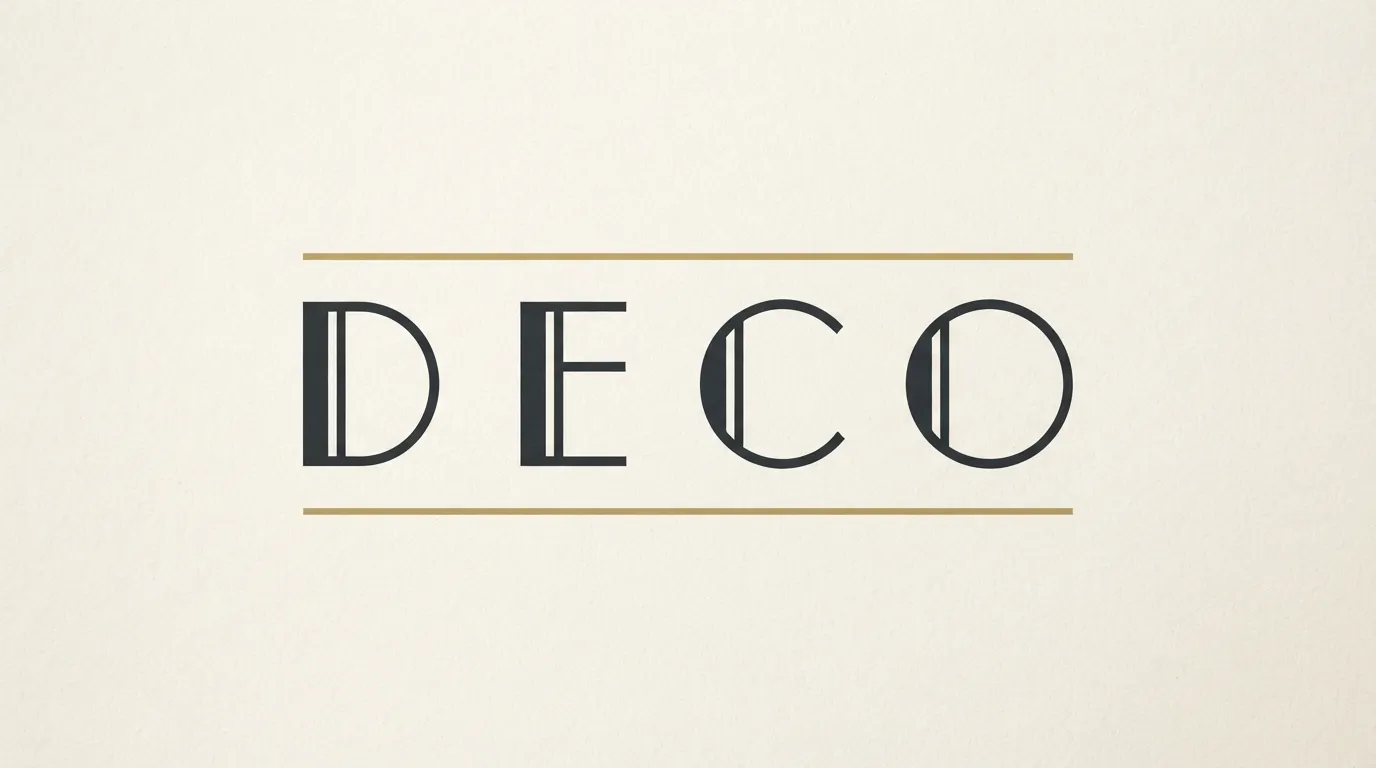
Art deco lettering is built, not drawn. Circles, straight lines and strong verticals make up the letters, and capitals do most of the talking. Many deco-style headlines are set in widely spaced capitals, sometimes with a thin line above or below to echo an architectural detail.
Fabrik is the most direct catalog match for the early end of the period. FontCue describes it as an industrial grotesque in the style of the 1920s, based on Beteckna and influenced by Erbar Grotesk and Drescher Grotesk. It has 3 styles. As a grotesque rather than a decorative face, it suits a clean, factory-era look better than a glitzy one.
Josefin Sans is a geometric sans with 6 styles, so you can run a heavier weight for a title and a lighter one for a subtitle from a single family. Its geometric shapes make it a common choice when someone wants a deco feeling without a heavy ornamental font. Abril Fatface goes the other direction with a single, very heavy style and dramatic thick-thin contrast, which suits a bold poster headline.
A practical recipe: set the title in capitals, add generous letter spacing, keep the layout symmetrical, and use a thin rule or a simple border. Restrict the palette to two colors. Too much decoration makes deco look cheap, since the geometry already provides the interest.
1950s diners, signs and script
Diner and roadside lettering is friendly, bold and made to be seen from a moving car. Two families dominate: heavy slab or block capitals for the main sign, and a flowing connected script for the product, the special or the name of the place.
For the block half, Bevan is a heavy slab serif by Vernon Adams with 2 styles, and its thick feet give it a sturdy sign-painter feel. Bowlby One is a single, very heavy style that fills a banner or a menu header. Either looks good in capitals, set tight and given a simple drop shadow in a second color.
For the script half, Pacifico fits well because FontCue describes it as a flowing script originally inspired by 1950s American surf culture. It has a single style, and it works for a word like “Coffee” or “Fresh” laid over a block headline. Lobster is a bold connected script by Impallari Type that gives a similar effect with a more compact, weighty line. Both are single styles, so there is no italic to switch to, and the script is best kept to one or two words.
A classic trick is to place a script word at a slight upward angle across a block word so the two overlap. It resembles old signage and gives a layout energy without extra fonts. Use no more than two typefaces: one block, one script. For more heavy headline options, our guide to poster fonts has plenty.

70s groovy and rounded display
The 70s look is soft, thick and warm, and it is the easiest of the three to overdo. Letters have rounded terminals, big bowls and very little space between them. Many 70s fonts are set in lowercase, because fat round shapes are easier on the eye there than in capitals. A groovy font often adds a wavy baseline, an inline stripe or a curved text path, and the result looks best on a plain, warm background.
The catalog has several rounded display fonts that can get you there. Righteous is a single-style display face by Astigmatic with geometric, rounded-edged letters. Fredoka has 4 styles, so you can step from a light weight to a heavy one. Sniglet comes in 2 styles, and FontCue says it rounds off every corner so aggressively that its letters feel squeezed from soft clay. Bubblegum Sans is a puffy, single-weight font that pushes the idea further, though it is closer to bubbly than strictly 70s, so test it before you commit.
I would use these sparingly. A groovy font works on a poster headline and gets tiring fast in long paragraphs. Set the title large, keep it to a few words, and let the colors do the rest: mustard, brown, cream, burnt orange and olive. For the rounded and playful side of current trends, see our guide to aesthetic font trends.

Pairing a vintage headline with a readable body font
A loud vintage headline wants a quiet partner, and the partner should not try to be vintage too.
For a serif partner, Lora has 6 styles and a calm, readable texture that sits well under a heavy slab or a fat face. For a sans partner, Work Sans also has 6 styles and is plain enough to stay out of the way under a script or a rounded display font. Glacial Indifference is a clean geometric sans inspired by Bauhaus shapes, with 2 styles, and its even letters make a tidy partner for art deco headlines.
Three guidelines help:
- Use one vintage font per design. Two competing display fonts cancel each other out.
- Keep body text in a modern, readable font at a normal size, and save the personality for headlines and short labels.
- Give the headline room. Old-fashioned display type needs margin and line spacing, or the whole layout feels cramped.
For more on combining styles, see our guide to font pairing and hierarchy.

Aging and texture without hurting legibility
A clean digital font can look too perfect for a vintage design. A little age fixes that, as long as the text stays readable. Keep the letter shapes intact and age only the surface.
Start with color. Replace pure black and pure white with a warm off-black and a cream. This alone makes a layout feel printed. Then add a subtle paper or grain texture behind the lettering rather than over it, so the letters keep clean edges. If you do add texture to the type, keep it light and uneven, and avoid a heavy distressed overlay on small text.
Apply roughness only to display text and only at large sizes. A distress effect that looks charming at 120 pixels turns to noise at 14. Shrink the design to thumbnail size: if you can still read the headline, the texture is fine, and if letters start to merge, reduce the effect.
Misregistered color, where a second color sits slightly off the first, looks like old printing. A thin inline or shadow adds depth without roughness. Both are easy to remove if they turn out to be too much. Our guide to outline, 3D and shadow font effects covers how to build them in a design tool.

Licensing for prints and merch
Posters, mugs, T-shirts and packaging all count as commercial use if you sell them. Every font linked in this article is listed on FontCue with SIL Open Font License 1.1 terms and commercial use marked as allowed. Read the license on each font page before you commit, because that page is the source of truth, and check the license page of any font that is not linked here.
The font license covers the typeface only. It does not cover the words you set in it. A vintage look is not permission to copy a real brand’s logo, a team’s name or a band’s mark, and none of the fonts in this article are reproductions of any specific logo. If you are making merchandise, set your own name and your own artwork.
Keep a copy of the license file with the project and note the font version you used. If a printer, platform or client asks which fonts are in the artwork, you will have the answer. For a broader checklist, see our guide to free fonts and commercial use.
Vintage usually means the style comes from an earlier era, such as the 1920s or the 1950s. Retro means a modern design that imitates that look. In practice the two terms overlap, and most people searching for either want the same thing: letterforms that feel like a particular decade.
Look for geometric construction, strong verticals and sharp contrast between thin and thick strokes, often in capitals. FontCue lists Fabrik, an industrial grotesque in the style of the 1920s, and Josefin Sans, a geometric sans. Set either in spaced capitals to push the deco feeling further.
Soft, heavy shapes. Think rounded terminals, tight spacing, big bowls and warm, chunky letters, often set in lowercase. Fonts such as Righteous, Fredoka and Sniglet share some of those traits. Pair them with earthy colors like mustard, brown and burnt orange to complete the era.
Check the license on each font page before you sell anything. The fonts linked in this article are listed on FontCue with SIL Open Font License 1.1 terms and commercial use marked as allowed. That covers the font only, not any brand name, logo or trademark you might set in it.
Choosing vintage fonts by decade
Decide on the era before you open the font list. For the 1920s, pick geometric capitals and keep the layout symmetrical. For a 1950s sign, pair a heavy slab with one connected script. For the 70s, go soft and round, set it in lowercase and let a warm palette carry the mood. Whatever the decade, use one display font, give it a calm body partner, and age the surface lightly so the words stay readable. I would pick the plainer option over the most decorated one almost every time, because a reader should get the feeling of an era and still understand the message at a glance. Download a few from the display category, set your own headline in each, shrink it to a thumbnail and keep the one that still reads. If two fonts both survive that test, choose the one whose decade matches your colors.
